
If your organization is used to real-time user provisioning and deprovisioning via SCIM, it's important to note that 101domain does not currently support SCIM. Instead, user access is managed through Authentication Policies, particularly the "SSO Only" policy, which ties access to your organization's Identity Provider (IdP).
How SSO-Only Authentication Works
When you select the SSO Only authentication policy for your 101domain account:
-
User access is linked to both their 101domain account and their status in your organization's IdP (such as Google, Microsoft, Okta, or OneLogin).
-
If a user is deactivated or suspended in your IdP, they will not be able to log in to 101domain. Their access is automatically blocked at their next login attempt.
-
User identity is re-authorized regularly during active sessions.
-
The Primary Account Owner can revoke a sub-user’s access at any time from the 101domain control panel.
Note: An Identity Provider (IdP) is the system (such as Google, Microsoft, Okta, or OneLogin) that manages and authenticates a user's identity when they log into a separate service like 101domain.
Onboarding a User
When onboarding a user to your organizations 101domain account, the Primary Account Owner is required to complete the following steps
-
The Primary Account Owner sets up the IdP integration in the 101domain account.
Follow the steps detailed in Accessing the SSO Configuration Panel to successfully setup IdP integration.
-
Create the sub-user’s account within 101domain.
-
Pre-configure SSO for the sub-user before they attempt to log in with your organization’s IdP credentials.
Review the Managing Sub-User Access and Enforcement section to learn more about enabling SSO for new and existing users.
Offboarding a User
The process for offboarding a user will depend on the SSO configuration for the user:
If the user is set to "Require SSO":
-
Deactivate or suspend the user in your organization's IdP.
-
The user will be unable to authenticate or log in to 101domain.
-
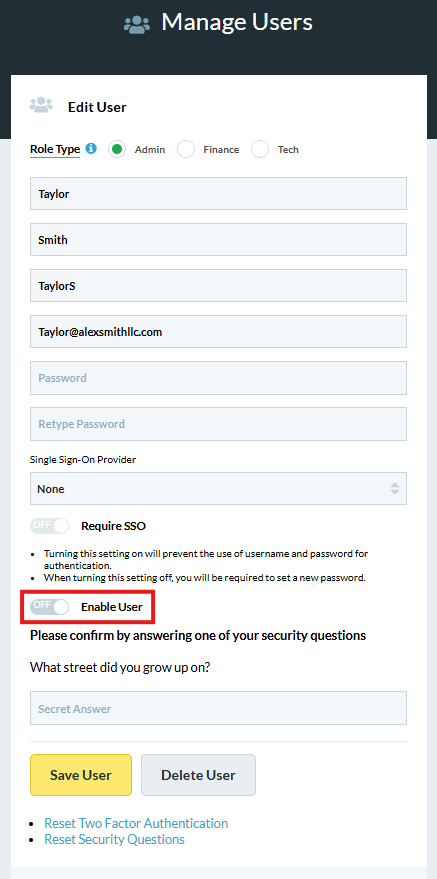
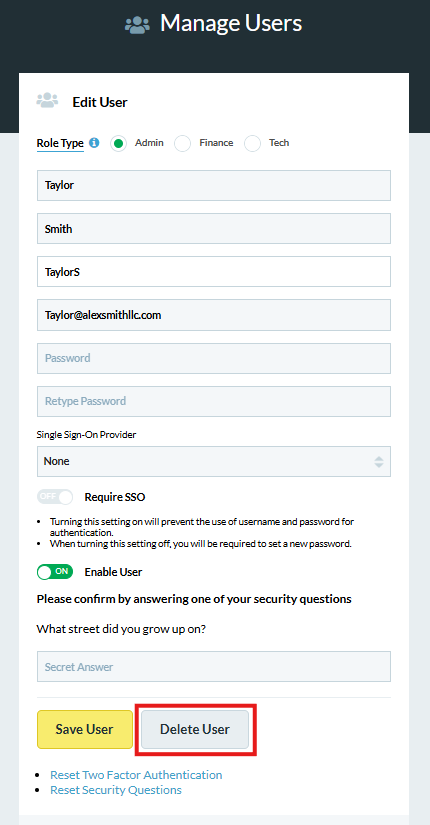
The Primary Account Owner should either disable or delete the sub-user account in 101domain to complete the offboarding process.
If the account allows "SSO or username/password":
-
The Primary Account Owner should either disable or delete the sub-user account in 101domain to complete the offboarding process.
For more information on Authentication Methods, visit our article Authentication-Only: What 101domain SSO Does.