
The 101domain API enforces rate limits to ensure reliable performance and fair usage across all clients. Each API key has both Requests per Second (RPS) and Requests per Hour (RPH) limits, which you can find in your Developer Tools alongside your API key entries.
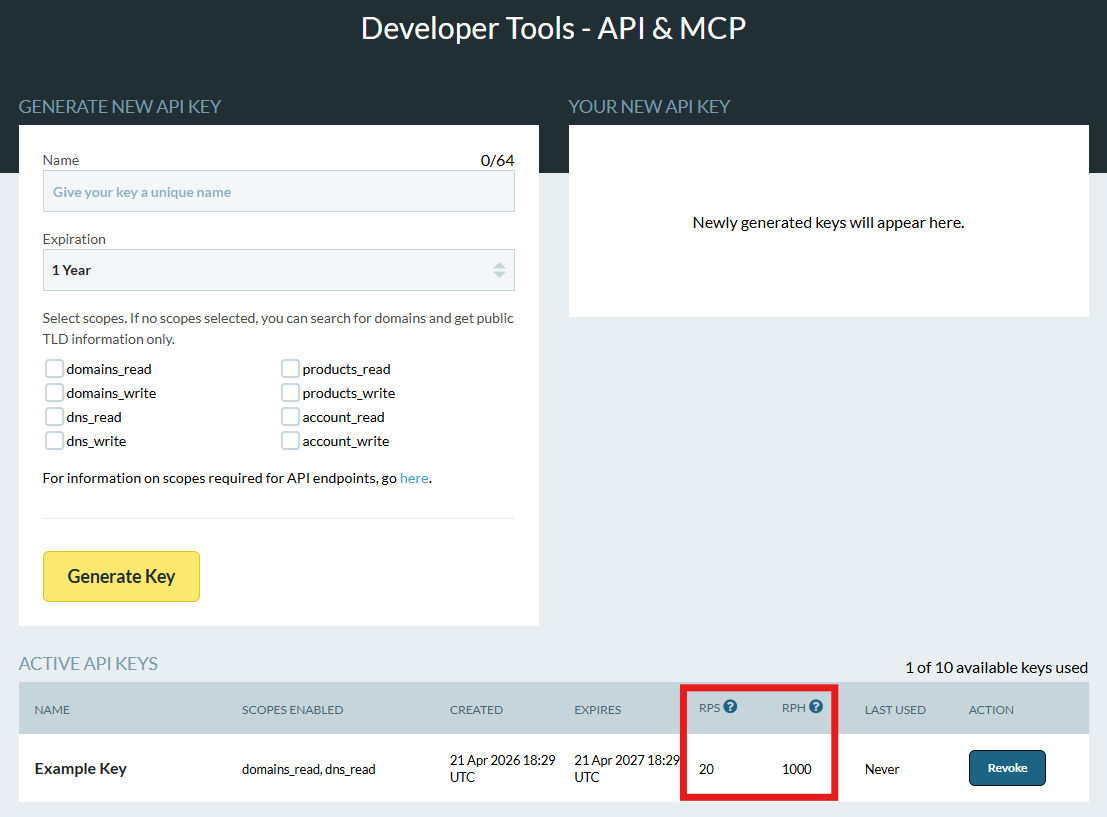
By default, your RPS and RPH quotas are shared across all of your API keys under the same 101domain account. If your combined traffic exceeds those limits, the API will reject additional calls with a 429 Rate Limit Exceeded error.
When you hit the rate limit:
-
The API returns HTTP status
429 Too Many Requests. -
The response includes a
Retry-Afterheader indicating when you can safely retry the request.
Example Response (429 Rate Limit Exceeded):
{
  "status": "error",
  "code": "TOO_MANY_REQUESTS",
  "message": "Rate limit exceeded. Please wait before retrying.",
  "errors": null
}
To resolve this:
-
Reduce request frequency so you stay within your configured RPS/RPH limits.
-
Obey the
Retry-Afterheader by pausing further requests until the specified time.
If you have a legitimate high-volume use case, contact our Support Team by Opening a Support Ticket at my.101domain.com with details about your integration to request higher limits.