
If you registered a domain on behalf of a company or organization, the Registrant Organization field identifies the legal entity that holds the rights to that domain name. When this field is filled in, the organization - not the individual - is treated as the domain owner of record.
Under ICANN's Registration Data Policy, if you have provided an organization name for an ICANN-sponsored Generic Top Level Domain (gTLD), you have a choice about whether that information is made publicly visible in the Registration Data Directory Services (RDDS) that the public accesses via RDAP (Registration Data Access Protocol) lookups. This article explains what that means and how to manage it.
What Publication Means for Your Organization
When you publish your Registrant Organization, your company name becomes part of the public domain record. It is visible to anyone who looks up your domain in RDAP. This is often appropriate for businesses that want to clearly signal ownership, particularly for brand protection or transparency purposes.
If you choose not to publish, your organization name is withheld from public RDAP records. Your domain remains fully registered and functional. The information is simply not publicly displayed.
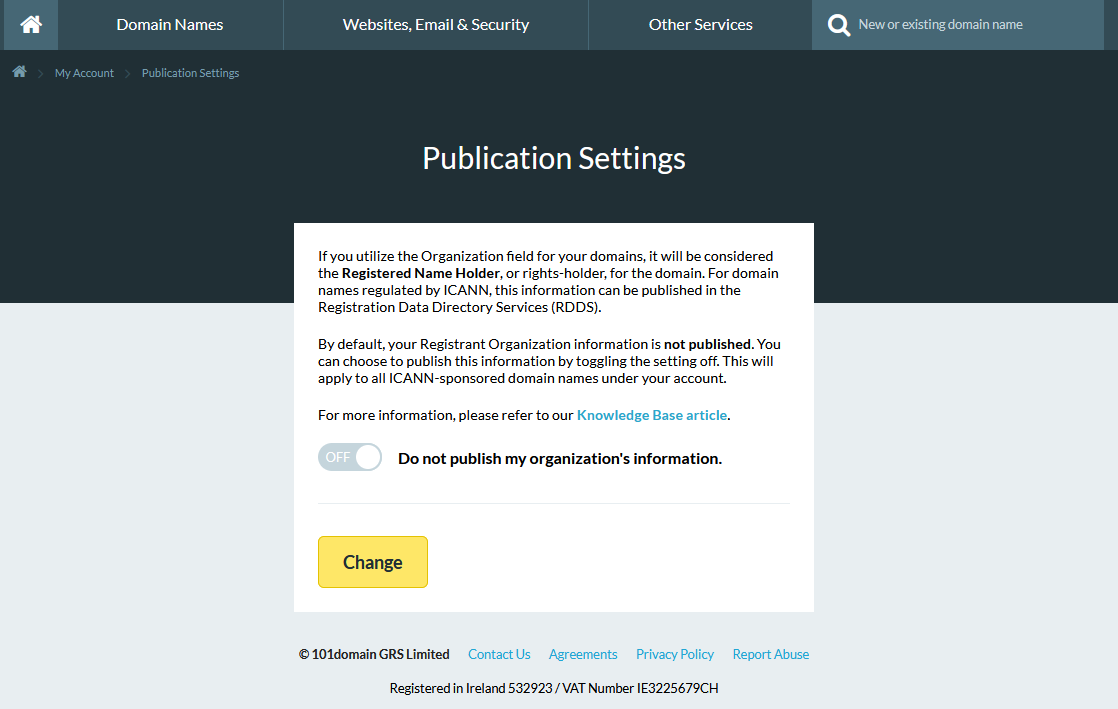
Default Setting: Your Registrant Organization information is not published by default.
Applying Changes: Any changes you make to your publication settings will automatically trigger updates for all ICANN domain names under your account.
Individual vs. Organization Ownership
When registering or managing your domain through 101domain, the Registrant Organization field has a direct impact on legal ownership of your domain.
-
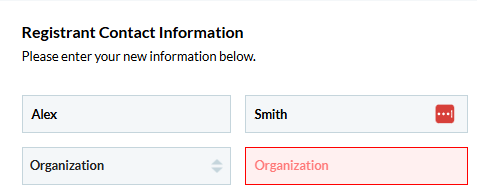
If you are registering on behalf of an Organization, select Organization from the dropdown. You will need to fill in the field with your organization name.
-
If you intend to register a domain as an individual rather than on behalf of a business, select Individual. You will not be able to fill in the organization field.
Steps to Change Your Publication Settings
-
Select the My Account button which can be accessed via the Welcome drop down (found in the upper-right menu).
-
Under the Contact Information section, select Publication Settings.
-
Use the toggle to change your preference.
To learn more about Domain contacts, visit our article Domain Contacts Explained: Registrant, Administrative, Technical, and Billing and What Is a Domain Technical Contact and Do You Need One?.
Additional information on RDDS and RDAP can be found at What is Registration Data Directory Services (RDDS)? and What is RDAP (Registration Data Access Protocol)?
If you have any questions, contact our Support Team at 877.983.6624 (US) or +1.760.444.8674 (International).